




Website Redesign Process Guide for SMBs
Website Redesign Process Guide for SMBs

TL;DR:
- A website redesign is a strategic overhaul that improves user experience and aligns with business goals. It involves comprehensive discovery, planning, content architecture, development, SEO migration, testing, and post-launch monitoring to ensure success. Proper project governance, thorough audits, and phased implementation prevent costly mistakes and help sustain long-term performance.
A website redesign is a structured process of rebuilding your site's content, design, and technical foundation to improve user experience and business performance. This website redesign process guide covers every phase from discovery to post-launch monitoring, so you can approach your revamp with confidence. We reference tools like Figma for wireframing, Google Analytics 4 (GA4) for performance tracking, and SEO migration frameworks to protect your search rankings. Whether you're redesigning a business website for the first time or refreshing an outdated site, this guide gives you a clear path forward.
What does a strong website redesign process guide actually cover?
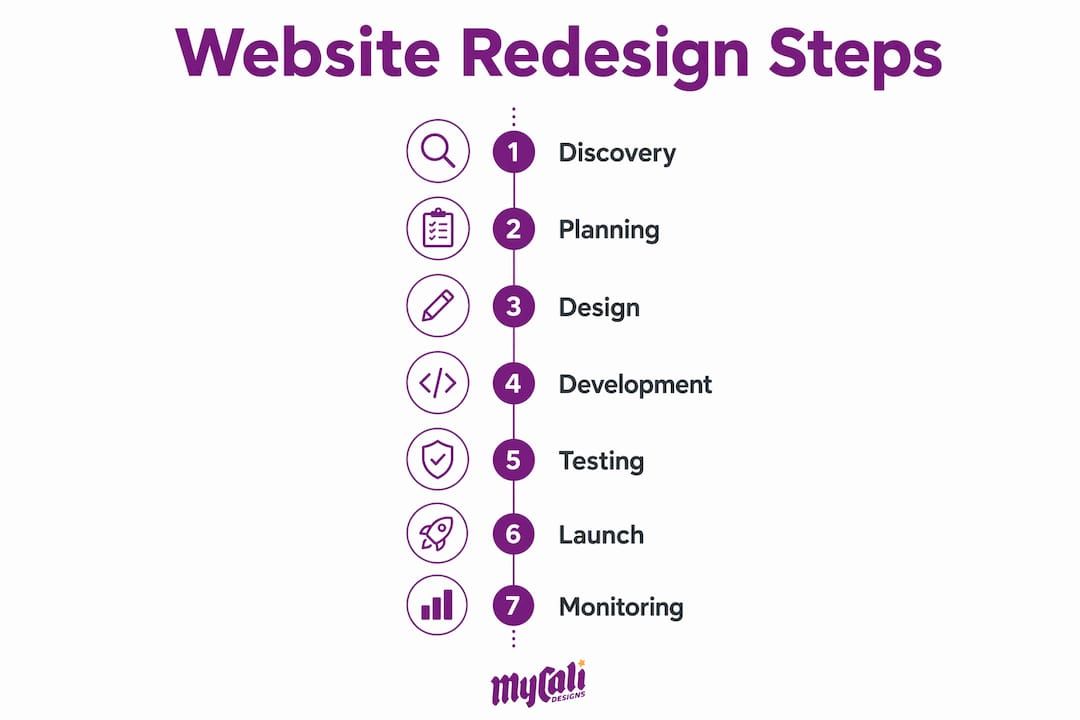
A successful redesign is not just a visual refresh. It is a strategic overhaul that aligns your site with your current business goals, your customers' needs, and search engine requirements. The most effective website redesign steps follow a defined sequence: discovery, planning, design, development, launch, and post-launch optimization. Skipping any phase creates costly problems later, from broken redirects to misaligned stakeholder expectations. Think of this guide as your project blueprint, not just a checklist.
What preparatory steps are essential before you start?
The discovery phase is the single most important step in any website revamp. Organizational alignment across sales, customer support, and leadership prevents scope creep and missed deadlines before a single wireframe is drawn. Without it, you end up redesigning by committee, where everyone has a veto and no one has a clear direction.
Before your project kicks off, complete these four audits:
- Content audit: Catalog every existing page. Flag what to keep, merge, update, or delete.
- Technical audit: Check site speed, broken links, crawl errors, and mobile responsiveness.
- UX/usability review: Identify where users drop off using tools like Hotjar or Microsoft Clarity.
- SEO baseline: Document your current keyword rankings, traffic, and top-performing pages in GA4.
Assign a Single Point of Contact (SPOC) on your team to own decisions and communicate with your agency or developer. This one step alone prevents the "too many cooks in the kitchen" problem that derails more redesigns than any technical issue.
Pro Tip: Before your kickoff meeting, write a one-page brief that states your top three business goals for the redesign. Share it with every stakeholder. This document becomes the filter for every design and content decision that follows.
How do you plan and design for content architecture first?
Content architecture is the structural plan for how your pages, categories, and navigation connect. Figma's design team prioritizes content architecture over visual layout in early redesign phases to make sure the site structure meets real user needs. This approach is the right one. Most SMBs make the mistake of choosing colors and fonts before deciding what their site actually needs to say and where.
Follow this sequence for the planning and design phase:
- Define your site structure. Map out every page using a sitemap tool like Slickplan or even a simple spreadsheet.
- Build wireframes. Use Figma or Balsamiq to create low-fidelity layouts that show content placement without visual distraction.
- Create a prototype. Turn wireframes into clickable prototypes for stakeholder review before any development begins.
- Apply visual design. Only after structure and content are approved, layer in typography, color, imagery, and brand identity.
The table below compares common design tools for each phase:
| Tool | Best For | Phase |
|---|---|---|
| Figma | Wireframing, prototyping, and handoff | Planning and design |
| Balsamiq | Quick low-fidelity wireframes | Early planning |
| Adobe XD | High-fidelity visual mockups | Visual design |
| Slickplan | Sitemap and content architecture | Discovery and planning |
| InVision | Stakeholder review and feedback | Design approval |
Pro Tip: Lock your sitemap and content outline before opening any design tool. Changes to site structure after visual design begins cost two to three times more time than changes made at the wireframe stage.
Content architecture is also where you decide which pages to cut. Carrying over every legacy page from your old site is one of the most common and costly mistakes in redesigning a business website.
How do you handle development, SEO migration, and QA testing?
Development is where your approved designs become a functioning website. The build phase must run in parallel with a rigorous SEO migration plan. Every old URL requires a complete 301 redirect map before launch to prevent ranking loss. A 301 redirect tells search engines that a page has permanently moved, passing its authority to the new URL. Missing even a handful of high-traffic redirects can cause significant drops in organic traffic that take months to recover.

Content migration also requires discipline. Prune, merge, or delete underperforming legacy pages instead of copying everything to the new site. Migrating content debt only multiplies your maintenance burden and dilutes your site's quality signals.
Your quality assurance (QA) checklist before launch should cover:
- Mobile load times: Target under 3 seconds on all key pages.
- Cross-browser testing: Check Chrome, Safari, Firefox, and Edge.
- Form functionality: Submit every form and confirm data reaches its destination.
- Internal links: Audit for broken links using Screaming Frog or Ahrefs.
- Accessibility: Run pages through WAVE or axe to catch contrast and alt-text issues.
- Analytics tracking: Confirm GA4 events and conversion goals fire correctly in a staging environment.
For SEO, follow a structured migration checklist that includes verifying canonical tags, updating your XML sitemap, and resubmitting to Google Search Console after launch.
Pro Tip: Never launch directly from your development environment. Use a staging server that mirrors your live hosting setup. Test there for at least one full week before DNS cutover.
What should you do during and after your website launch?
The launch sequence is not a single event. It is a coordinated handoff that requires sign-off, redirect activation, DNS cutover, and immediate monitoring. DNS propagation can cause users to see mixed versions of your site for 24–48 hours after launch. Tell your stakeholders this in advance. It is a normal technical reality, not a failure.
Your immediate post-launch checklist should include:
- Confirm all 301 redirects are live and returning the correct status codes.
- Verify GA4 is tracking sessions, events, and conversions accurately.
- Submit your updated XML sitemap to Google Search Console.
- Check your homepage and top five pages on mobile and desktop.
- Test every contact form, checkout flow, or booking system.
- Monitor your server error logs for unexpected 500 errors.
After the initial launch checks, commit to a 90-day monitoring window. Post-launch performance should be tracked for at least 90 days, with specific attention to mobile homepage load times under 3 seconds and unexpected 404 errors. That 90-day window is when most performance regressions surface and when early wins can be amplified.
Track your website performance metrics weekly during this period. Look at organic traffic trends, bounce rates, and conversion rates against your pre-launch baseline. If you see a sharp drop in any metric, act within 48 hours rather than waiting for a monthly review.
Phased rollout strategies allow gradual implementation and testing of redesign features, which reduces user disruption. If your site is large or complex, consider launching core pages first and rolling out secondary sections over two to four weeks.
How do you avoid common website redesign pitfalls?
Most redesign projects fail not because of bad design but because of poor project governance. A clear decision hierarchy that limits veto authority speeds approvals and reduces delays. Define who has final say on design, content, and technical decisions in your kickoff meeting. Write it down.
The most common pitfalls in redesigning a business website include:
- Scope creep: Adding new features mid-project without adjusting the timeline or budget.
- Content delays: Waiting until development is complete to write or gather content.
- Ignoring SEO migration: Launching without a redirect map and losing months of ranking equity.
- Skipping user testing: Approving designs based on internal preference rather than user behavior data.
- Poor stakeholder communication: Failing to explain DNS propagation delays or phased rollout timelines.
Pro Tip: Create a simple change request form for any scope additions after kickoff. Require a written estimate of time and cost impact before approving any change. This one habit keeps projects on schedule and prevents budget overruns.
For SMBs working with a design agency, establish a weekly check-in cadence. Short, focused updates prevent surprises and keep both sides aligned. The web design and business growth connection is real, but only when the project is managed well from start to finish.
Key takeaways
A successful website redesign requires strategic planning, disciplined SEO migration, and consistent post-launch monitoring to protect performance and drive business growth.
| Point | Details |
|---|---|
| Start with discovery | Align stakeholders and complete content, technical, and SEO audits before any design work begins. |
| Prioritize content architecture | Map your site structure and wireframes before applying visual design to avoid costly rework. |
| Protect SEO with 301 redirects | Map every old URL to a new destination before launch to prevent organic traffic loss. |
| Monitor for 90 days post-launch | Track mobile load times, 404 errors, and conversion rates weekly for the first three months. |
| Define your decision hierarchy | Limit veto authority early to prevent scope creep and keep your project on schedule. |
What i've learned after guiding smbs through redesigns
The biggest mistake I see business owners make is treating a redesign as a design project. It is a business project that happens to involve design. When we start with clear goals and a defined decision hierarchy, everything downstream moves faster and costs less.
Content architecture is consistently undervalued. Clients want to see color palettes and logo placements in week one. But the sites that perform best are the ones where we spent the first two weeks mapping user journeys and content priorities before touching a single visual element.
SEO migration is the area where I see the most preventable damage. One missed redirect on a high-traffic page can erase months of ranking work. The AI SEO strategy considerations that matter in 2026 make this even more critical, since generative search surfaces structured, well-organized content above everything else.
My honest advice: give yourself a realistic timeline. Most SMB redesigns take 8–16 weeks when done properly. Rushing the QA phase or skipping stakeholder sign-offs to hit an arbitrary launch date creates problems that cost far more to fix than the time you saved.
— Cesar
Ready to redesign? Mycalidesigns can help
Mycalidesigns works with small and medium-sized businesses to build websites that look professional, perform well in search, and convert visitors into customers. We handle everything from discovery and content architecture to development and post-launch monitoring, so you get a site that actually supports your growth.
If you're ready to move forward with a custom website development project, we'd love to talk through your goals and put together a plan that fits your business. We've helped businesses across industries refresh their online presence with strategy-first design and technical execution that protects what you've already built. Reach out to the Mycalidesigns team and let's build something worth showing off.
FAQ
What is a website redesign process guide?
A website redesign process guide is a step-by-step framework covering discovery, planning, design, development, launch, and post-launch monitoring. It helps business owners complete a site overhaul without losing SEO rankings or user trust.
How long does a website redesign take for an SMB?
Most small to medium-sized business redesigns take 8–16 weeks from discovery to launch. Complex sites with e-commerce or custom functionality may require additional time for QA and content migration.
How do i protect my SEO during a redesign?
Map every existing URL to a new destination using 301 redirects before launch. Resubmit your XML sitemap to Google Search Console immediately after going live to minimize ranking disruption.
What should i monitor after launching a redesigned website?
Track performance for 90 days post-launch, focusing on mobile load times under 3 seconds, 404 errors, organic traffic trends, and conversion rates in GA4.
What is content debt and why does it matter in a redesign?
Content debt refers to outdated, duplicate, or underperforming pages that accumulate over time. Auditing and pruning this content before migration improves site quality and reduces long-term maintenance costs.
Recommended
Recent Posts