



THE BEST WEBSITE DESIGN & SEO SERVICES IN SACRAMENTO
Expert Website Design, Development & SEO for Sacramento Businesses
Is your Sacramento business standing out online, or getting lost in the shuffle? Whether you’re in Downtown, Midtown, or anywhere in the greater Sacramento area, our team specializes in web design and SEO that drives real results for local businesses. Unlike other agencies, we go beyond templates—we tailor every website to your brand’s identity and optimize it for Sacramento’s unique digital landscape, bringing more local customers to your door.
Why Choose My Cali Designs for Your Sacramento Website?
Proven Local Results
We’ve helped businesses like Ginny Parks, Brian Fullerton, and Seven Leaves grow their online presence and attract more Sacramento-area customers.
Transparent process
From discovery to launch, you know what to expect—no hidden fees or surprises.
Comprehensive seo
We don’t just build beautiful websites; we ensure they rank high for Sacramento searches so your ideal customers find you first.
Our simple 4-step process
1
Discovery
We learn your business goals and Sacramento market challenges.
2
Design
Our team crafts a website that showcases your brand and appeals to local customers.
3
Deveolopment
We bring your site to life with SEO best practices and fast load times.
4
Launch
Go live with a site that’s optimized for Google, Bing, and local search—plus ongoing support.
We Handle What Others Miss
Other agencies stop at “looks good.” We go further—integrating Google Analytics, Google Search Console, and Bing Webmaster Tools, so you have the data to make decisions and keep improving. We’ll also set up or update your Google Business Profile, making sure Sacramento-area customers can find your hours, location, and reviews in just a click.
See how these Sacramento businesses have transformed their online presence with our help!
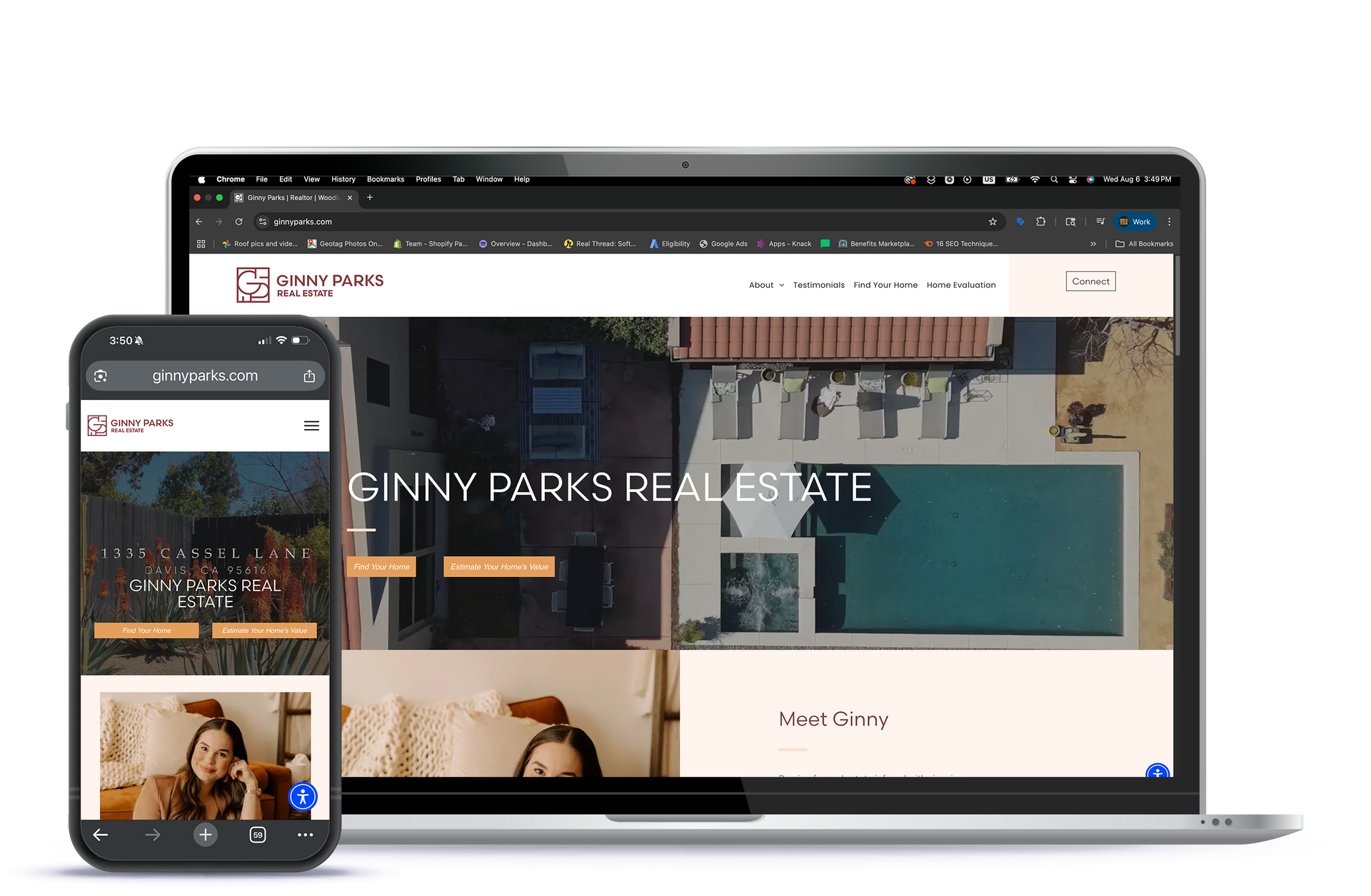
Ginny Parks
Brian Fullerton
Dustin Hall
Seven Leaves
Selymon Shahsamand
Harlan Family
Search Engine Optimization (SEO) That Delivers
Every day, Sacramento customers are searching for businesses like yours. If your website isn’t showing up, you’re leaving money on the table.
We dig deep to understand your business goals, then research the best keywords and competitor strategies in Sacramento. Our SEO process ensures your website attracts high-value, local traffic—so you grow faster.

Client
“After working with My Cali Designs, our website not only looks amazing, but our calls from Sacramento customers have doubled.”
— Ginny Parks
Midtown Sacramento

What Is Responsive Web Design—and Why Does Your website Need It?
Ever tried visiting a website on your phone, only to find that the text is microscopic, links are impossible to tap, and you end up pinching and zooming just to read anything? You're not alone. With more than half of all internet traffic now coming from mobile devices (yep, that's according to Statista), having a website that works flawlessly on every screen size isn't just a nice-to-have—it's essential.
Responsive web design is the approach of building your website so it automatically adapts to any device, whether it's a phone, tablet, or desktop. Instead of building separate sites for each device (which would be a headache for everyone), a responsive site uses flexible layouts, images, and smart coding to make sure your content looks polished and functions smoothly everywhere.
Why does this matter? Here’s what’s at stake:
- User Experience: Visitors stick around (and are more likely to become customers) when your site is easy to navigate—no pinching, scrolling sideways, or endless zooming.
- SEO Benefits: Google prioritizes mobile-friendly websites in search results, so a responsive design gives you a clear edge when customers are searching for businesses in Sacramento.
- Future-Proofing: As new devices hit the market, a responsive site keeps up nicely—so you’re not constantly playing catch-up.
In every website project, we make responsive design a non-negotiable. It simply ensures your business connects with your customers wherever they are, on whatever device they're using. That’s not just good design—it’s good business.
What should be included in the content and branding materials for a new website?
Essential Content and Branding Materials for Your New Website
Getting your website off the ground starts with assembling the right assets. The heart of your online presence is your content and visuals—so, what should you have on hand from the beginning?
Start by collecting your brand’s assets:
- Logo files in various formats (SVG, PNG, JPG)
- Color palette (primary, secondary, accent colors)
- Typography (preferred fonts or web-safe alternatives)
- Key imagery such as team photos, product shots, or location images
- Supporting graphics or icons that represent your brand
Next, think through your website’s structure and the core information visitors will expect. Sketch a quick outline of:
- Main pages (Home, About, Services, Products, Contact)
- Company story or background
- Descriptions of offerings (services, products, pricing, FAQs)
- Testimonials or reviews from happy clients
- Contact information and location details
As you build or refresh your website, making these decisions early ensures a smoother process—and helps your business look polished right from the start.
How can you ensure you get a website design you actually like?
How to Ensure You Love Your website Design
Getting a website you’re truly proud of doesn’t have to be a shot in the dark. Here’s how to make sure the final result matches your vision:
- Define Your Goals: Before anything else, clarify what you want your website to achieve—whether that’s generating leads, showcasing a portfolio, or selling products.
- Gather Inspiration: Explore websites you admire (think Apple, Airbnb, or National Geographic) and note what draws you in: color palettes, layout, imagery, or tone.
- Collaborate and Communicate: Be open with your design team about your likes, dislikes, and must-haves. Regular feedback and clear communication throughout the process help prevent surprises.
- Stay Involved: Participate in key stages—Discovery, Design, Development, and Launch. Your input at each phase is crucial for ensuring alignment with your vision.
- Test and Refine: Don’t settle for “good enough.” Test the site on different devices, ask others for feedback, and iterate until you’re satisfied.
Ultimately, the more proactive and engaged you are, the more likely you’ll end up with a website that fits your brand—and that you genuinely love.
How is website accessibility and legal compliance handled in web design projects?
Ensuring Accessibility and Legal Compliance
When it comes to building your website, we know it’s more than striking visuals and catchy calls-to-action. That’s why we build accessibility and legal compliance right into our design process, ensuring every visitor can use your site with ease—and you stay on the right side of regulations.
- Accessibility: We follow best practices recommended by WCAG (Web Content Accessibility Guidelines)—think clear navigation, text alternatives for images, proper color contrast, and keyboard-friendly interfaces. This helps everyone, including users with disabilities, have a smooth online experience.
- Privacy Policy: Your visitors want to trust you with their information. We help you draft and display privacy policies so users know what data is collected and how it is used, following guidelines such as GDPR and CCPA when applicable.
- Terms and Conditions: We include a clear, custom-crafted terms and conditions page outlining how your website and its content should be used, protecting both your business and your customers.
These steps make sure your website isn’t just beautiful, but also responsible and trustworthy from the ground up.
What are the latest trends and insights in web design?
Web Design Trends & Insights
Latest Developments in Web Design
Designing a website that not only captures attention but functions seamlessly is no small feat these days. With new tools and design philosophies emerging every year, here are some of the trends that are shaping the look and feel of websites right now:
- Bold Typography and Color
Eye-catching fonts and vibrant palettes are being used strategically to highlight key information and drive engagement. This trend isn't just about aesthetics—it improves legibility and helps guide visitors to important calls to action. - Mobile-First and Responsive Layouts
Given that more than half of all web traffic comes from mobile devices, layouts designed with smartphones in mind are the rule—not the exception. Flexible grids and scalable elements ensure a smooth experience no matter which device your customer uses. - Micro-Animations and Interactive Elements
Subtle animations, hover effects, and interactive buttons are being used to engage users and direct attention to specific areas—without overwhelming visitors or slowing pages down. - Minimalism and White Space
Less continues to be more. Clean, uncluttered designs with ample breathing room keep things visually inviting and make it easier for visitors to navigate your site and find what they need quickly. - Enhanced Accessibility
Leading platforms are focusing on inclusive design, ensuring sites are navigable for all users by following best practices for color contrast, keyboard navigation, and screen reader compatibility. - Integration with Analytics and Personalization Tools
Tools like Google Analytics, Hotjar, and Optimizely are being baked into modern site designs, making it easier to measure performance, personalize content, and create A/B tests for continuous improvement. - Performance Optimization
Faster load times aren't just a nice-to-have—they're critical for SEO and user experience. Optimizing images, leveraging browser caching, and minimizing code are all best practices being woven into new builds.
From bold branding choices to a sharp focus on user accessibility and speed, the best modern websites bring together innovative design and smart technology to help your business stand out and convert visitors into loyal customers.
How much does it cost to develop a website?
How Much Does It Cost to Develop a website?
Website development costs can range quite a bit depending on your business needs, goals, and the complexity of the site you have in mind. In Sacramento, and beyond, we've seen everything from affordable DIY builds starting around $300, to fully custom websites from agencies that can reach $20,000 or more.
For most small businesses looking for a professional online presence, you can expect to invest somewhere between $5,000 and $10,000 for a custom-designed WordPress site with up to 10 pages, depending on features, design complexity, and whether you need things like ecommerce or specialized integrations.
What factors affect website pricing?
- Number of pages: More pages mean more design, content, and development time.
- Custom features: Online stores, bookings, or unique tools often require custom coding.
- Content creation: Copywriting, imagery, and video production can influence costs.
- Ongoing support: Maintenance, hosting, and updates are often separate from the initial build.
If you have a specific vision or unique requirements, we work with you closely to tailor a solution—and pricing plan—that fits your business perfectly. Want to dig deeper? Give us a shout and we’ll walk you through options, examples, and what you should expect to pay to get your business results.
What are the differences between popular web design platforms like WordPress, Shopify, Wix, Squarespace and Others?
Comparing Popular Web Design Platforms: WordPress vs. Shopify
When it comes to building your website, choosing the right platform is key—and WordPress and Shopify are two of the most common options, each with its own unique strengths.
WordPress is a highly flexible platform that supports a wide range of sites, from portfolios to complex business pages. Its open-source nature means you have access to countless plugins and design options. Whether you want to blog, build a business presence, or set up a membership portal, WordPress gives you control over both the look and functionality of your site. It's a favorite among users who want plenty of customization without starting from scratch.
Shopify, on the other hand, is tailored specifically for eCommerce. If your primary focus is selling products online, Shopify offers a streamlined experience. Its tools are optimized for managing inventory, processing payments securely, and supporting your online storefront right out of the box. Even without a technical background, you can quickly launch a professional, mobile-friendly shop.
In short, if flexibility and customization for a variety of website types matter most, WordPress often fits the bill. If your main goal is running an online store with maximum convenience, Shopify is built just for that. Both platforms can help your business grow online—you just need to choose the one that best matches your goals.
What should you do if you need help with your WordPress website?
Need Help with Your WordPress Website?
If you find yourself stuck—or even facing the dreaded “my site is down” moment—we’re here to help. Many small businesses have been there, but don’t worry, there are steps you can take to get back on track quickly:
- Restore from a Backup: If your site is down or acting strangely, check if you have a recent backup available. Tools like UpdraftPlus or Jetpack make restoring your website much easier.
- Disable Problematic Plugins or Themes: Sometimes a faulty plugin or incompatible theme update causes issues. Try disabling plugins or reverting your theme to the default to see if that resolves the problem.
- Check for Software Updates: Keeping your WordPress core, plugins, and themes up to date can often prevent or resolve issues.
- Seek Professional Support: If you’re unsure, don’t hesitate to reach out. We support businesses in diagnosing and fixing WordPress problems, from minor bugs to major website outages.
Keeping your website running smoothly is crucial for your business, and we can help you recover quickly—so you stay focused on what matters most.
Is web design typically done in-house or outsourced?
Is Web Design Work Typically Done In-House or Outsourced?
This is a common question for businesses thinking about launching a new website or revamping an existing one. Web design projects can be handled in-house, outsourced, or sometimes with a blend of both approaches.
Here’s what you should know:
- In-house web design means all work is completed by a dedicated team under one roof, often allowing for better collaboration, local expertise, and seamless communication. Many agencies value being hands-on and prioritize hiring skilled talent from regional universities like UC Davis and Sacramento State.
- Outsourced web design taps into external resources or agencies, sometimes overseas, to lower costs. While this option can be budget-friendly, it sometimes comes at the expense of direct oversight and unified vision.
We believe that working collaboratively with a close-knit, local team not only delivers higher quality, but also supports the vitality of our Sacramento community. Our commitment is to keep our web design work right here, ensuring long-lasting relationships and responsive service for every client.
What certifications do web designers and developers commonly have?
Common Web Design & Development Certifications
A commitment to excellence in web design often means staying up-to-date with industry-recognized certifications. Many professional web designers and developers hold certifications that demonstrate their expertise, including:
- Google Analytics Certification – Validates knowledge of web analytics and tracking user behavior.
- Adobe Certified Professional (Photoshop, Illustrator, XD) – Proves proficiency in the creative tools used for layout and UI design.
- Certified Web Developer (W3C) – Focuses on best practices in HTML, CSS, and JavaScript.
- HubSpot CMS Certification – Highlights skills in managing and optimizing content in a popular CMS platform.
- AWS Certified Cloud Practitioner – Useful for those integrating cloud-based tools or optimizing site hosting and scalability.
- CIW Web Design Specialist – Covers foundational web technology skills, accessibility, and site usability.
These certifications help ensure your website partner is bringing current, best-practice strategies to your project—whether you’re launching a new site, revamping an existing one, or looking to maximize technical SEO.