



What Is Website Accessibility? A 2026 Guide
What Is Website Accessibility? A 2026 Guide

Website accessibility means designing and building websites so that every person, including those with disabilities, can perceive, understand, navigate, interact with, and contribute to web content. The World Wide Web Consortium (W3C) and its Web Accessibility Initiative (WAI) define this as a fundamental human right, recognized formally under the UN Convention on the Rights of Persons with Disabilities. When a website is truly accessible, it removes the digital equivalent of a staircase at a building entrance. Nobody gets left outside.
The people who benefit most directly include those with:
- Visual disabilities — blindness, low vision, or color blindness
- Auditory disabilities — deafness or hard of hearing
- Motor disabilities — limited hand mobility, tremors, or paralysis
- Cognitive disabilities — dyslexia, ADHD, or memory impairments
- Neurological and speech disabilities — conditions affecting communication or processing
Accessibility is not a niche concern. The Americans with Disabilities Act (ADA), enforced by the Department of Justice, requires state and local governments and businesses open to the public to make their web content accessible. Getting this right is both a legal obligation and a design opportunity.
Why does website accessibility matter for everyone?
Equal access to information is the clearest reason. When a website blocks someone from completing a task because of a disability, that person is denied the same opportunity available to everyone else. Think about how much of daily life now runs through websites: health resources, transit schedules, voting information, job applications. A barrier on any of those pages is not a minor inconvenience.

The impact extends well beyond individuals with disabilities. Digital accessibility benefits all users through what researchers call the curb cut effect. Captions help someone watching a video in a noisy café. Keyboard navigation helps a power user who prefers not to reach for a mouse. Larger text and strong color contrast help older adults and anyone reading on a bright screen outdoors. Accessibility improvements tend to lift the experience for everyone.
For businesses, the stakes are concrete:
- Market reach — people with disabilities represent a large and often underserved audience
- SEO performance — properly structured, accessible content aligns directly with how search engines crawl and rank pages
- Reduced legal risk — proactive compliance limits exposure to ADA lawsuits and settlements
- Brand trust — demonstrating inclusive values builds loyalty across your entire customer base
Accessibility gap: The web remains largely inaccessible for a significant portion of users with disabilities, despite decades of published guidelines and legal requirements. Closing that gap is both a moral responsibility and a practical business decision.
What are the U.S. legal requirements for website accessibility?
The ADA is the primary legal framework governing web accessibility in the U.S. Two titles apply directly to websites:
- Title II covers state and local government agencies. Their websites must be accessible to people with disabilities, full stop.
- Title III covers businesses open to the public, referred to as "public accommodations." This includes retailers, restaurants, hotels, healthcare providers, and any business that serves the general public, whether in person or online.
The Department of Justice has taken the position since 1996 that the ADA applies to web content. Enforcement has only intensified since then. Businesses that ignore accessibility face real legal consequences, including lawsuits, settlements, and court-ordered remediation.
"An inaccessible website can exclude people just as much as steps at an entrance to a physical location. Ensuring web accessibility for people with disabilities is a priority for the Department of Justice." — U.S. Department of Justice, ADA.gov Web Accessibility Guidance
Common barriers that trigger legal complaints include:
- Missing alt text on images
- Videos without captions
- Forms that cannot be completed using a keyboard alone
- Poor color contrast that makes text unreadable
- Pages that break when a user zooms in or increases text size
The Web Content Accessibility Guidelines (WCAG) and the Section 508 Standards, which the federal government uses for its own websites, serve as the technical benchmarks most courts and agencies reference. Following WCAG 2.2 is the clearest path to demonstrating good-faith compliance under the ADA.

What are the four core principles of web accessibility?
The WCAG 2.2 standard, also recognized as ISO/IEC 40500:2025, organizes all accessibility requirements around four principles, often abbreviated as POUR. Every success criterion in the guidelines traces back to one of these four.
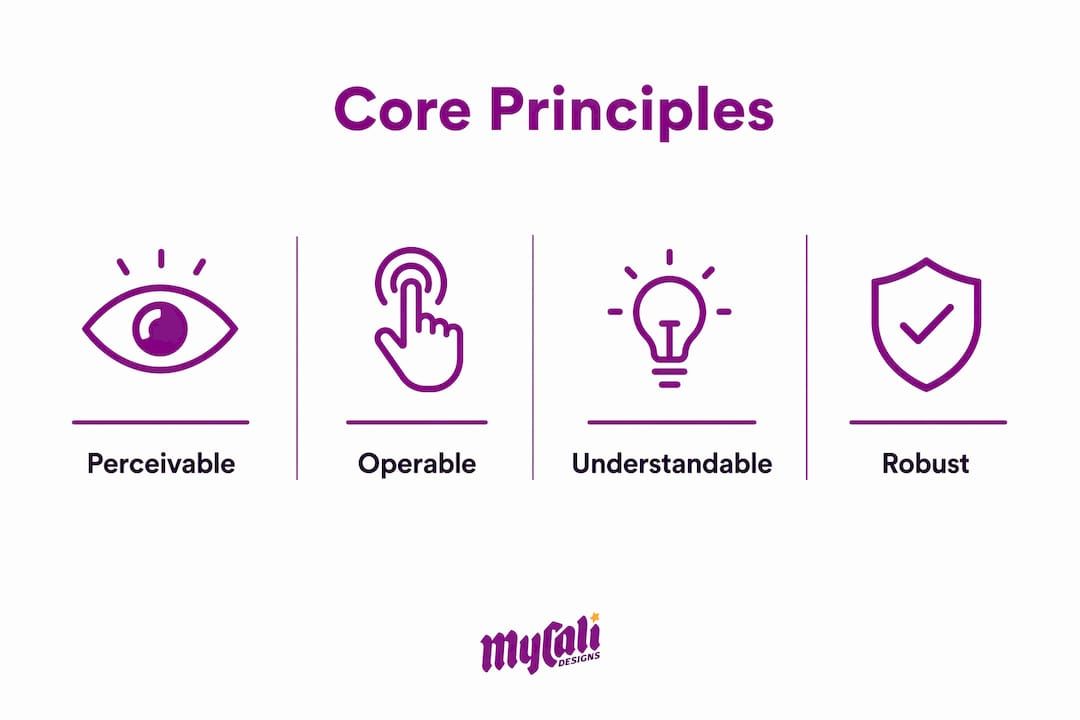
Perceivable
Content must be presentable to users in ways they can perceive. If someone cannot see an image, they need a text alternative. If someone cannot hear audio, they need captions or a transcript.
- Alt text on images conveys meaning to screen reader users
- Captions on videos serve users who are deaf or hard of hearing
- Sufficient color contrast makes text readable for people with low vision
Operable
Users must be able to operate the interface. Not everyone uses a mouse. Keyboard navigation, voice control software, and switch devices all depend on a site being fully operable without a pointing device.
- All interactive elements must be reachable and activatable by keyboard
- Users need enough time to read and complete tasks
- Pages should not contain content that flashes at rates known to trigger seizures
Understandable
Content and interface behavior must be understandable. This means clear language, predictable navigation, and helpful error messages.
- Form fields need visible labels and clear instructions
- Error messages must identify the problem and suggest a fix
- Navigation should behave consistently across pages
Robust
Content must be interpreted reliably by a wide range of assistive technologies, including current and future tools. This principle is largely about clean, standards-compliant code.
- Semantic HTML gives browsers and screen readers accurate information about content structure
- ARIA (Accessible Rich Internet Applications) roles supplement HTML where native semantics fall short
- Valid, well-structured markup reduces the chance that assistive technologies misinterpret the page
How do you make a website accessible?
Accessibility is most effective and least expensive when it is built in from the start. Integrating accessibility early in a project avoids the costly process of retrofitting an existing site and creates a more maintainable codebase over time. Treating it as an afterthought is like trying to add a ramp to a building after the concrete has set.
Here are the foundational practices:
- Use semantic HTML. Headings, lists, buttons, and form elements should use the correct HTML tags, not styled divs that look like those elements visually. Assistive technologies rely on the accessibility tree, not CSS, to interpret page structure.
- Write descriptive alt text. Every meaningful image needs a short, accurate text description. Decorative images should have empty alt attributes so screen readers skip them.
- Ensure keyboard navigability. Tab order should follow a logical reading sequence. Focus indicators must be visible so keyboard users always know where they are on the page.
- Meet color contrast requirements. WCAG 2.2 sets a minimum contrast ratio of 4.5:1 for normal text. Use a contrast checker during design, not after.
- Add captions and transcripts. Any video with spoken content needs synchronized captions. Audio-only content needs a text transcript.
- Label all form fields. Every input needs a programmatic label, not just placeholder text, which disappears when a user starts typing.
- Use ARIA roles carefully. ARIA fills gaps where HTML semantics are insufficient, but misused ARIA creates more problems than it solves. Native HTML elements are always preferable.
Pro Tip: Prioritize semantic document structure before worrying about visual styling. A screen reader navigates your page through headings and landmarks, not colors and fonts. Get the structure right first, and the visual layer can follow.
Responsive design also plays a role. A site that works on a phone but breaks when a user zooms to 200% fails the Perceivable and Operable principles. Test at multiple zoom levels and on multiple screen sizes as a standard part of your quality assurance process.
How do you evaluate and test website accessibility?
Testing is where good intentions meet reality. Automated accessibility checkers detect about 30–50% of accessibility issues. That is a useful starting point, not a finish line.
Automated testing tools
Popular tools include browser extensions and platform-integrated scanners that flag missing alt text, contrast failures, and missing form labels. They run quickly and catch the most common, machine-detectable errors. Their limitation is that they cannot judge whether alt text is actually meaningful, whether a navigation flow makes sense, or whether an error message is genuinely helpful.
- Axe DevTools (browser extension)
- WAVE (Web Accessibility Evaluation Tool)
- Lighthouse (built into Chrome DevTools)
- Siteimprove Accessibility
Manual testing
Manual testing covers what automated tools cannot. This includes:
- Navigating the entire site using only a keyboard
- Testing with a screen reader such as NVDA, JAWS, or VoiceOver
- Verifying that focus indicators are visible at every interactive element
- Checking that dynamic content updates are announced to assistive technologies
- Reviewing reading order and heading hierarchy for logical flow
User testing with people with disabilities
No automated scan or internal manual review replaces the insight of someone who actually uses assistive technology every day. User testing with people with disabilities surfaces usability problems that developers and designers, however well-intentioned, simply do not anticipate. Building this into your quality assurance workflow, even at a small scale, produces better outcomes than any tool alone.
Accessibility evaluation is not a one-time event. Websites change constantly. New content, new features, and third-party integrations all introduce potential barriers. Ongoing monitoring keeps accessibility from degrading over time.
Real-world examples of website accessibility features
Accessibility features are not abstract concepts. They show up in specific, concrete elements that users interact with every day. The table below maps common features to the disability categories they serve and the assistive technologies that depend on them.
| Accessibility Feature | Disability Category Served | Assistive Technology |
|---|---|---|
| Alt text on images | Visual | Screen readers (NVDA, JAWS, VoiceOver) |
| Video captions | Auditory | Caption display, media players |
| Keyboard navigation | Motor | Keyboard, switch devices, voice control |
| ARIA landmarks and labels | Visual, cognitive | Screen readers |
| Sufficient color contrast | Visual | No assistive tech required |
| Logical heading structure | Visual, cognitive | Screen readers, browser extensions |
| Form labels and error messages | Visual, cognitive | Screen readers |
| Text resize and zoom support | Visual | Browser zoom, magnification software |
A few of these deserve a closer look:
- Alt text is the most widely cited accessibility requirement, and also one of the most frequently skipped. An image of a bar chart without alt text is invisible to a screen reader user. A good alt text description conveys the chart's conclusion, not just "bar chart."
- ARIA landmarks divide a page into named regions: header, navigation, main, footer. Screen reader users can jump directly between landmarks, the way sighted users scan a page visually.
- Keyboard focus indicators are often removed by designers because the default browser outline looks plain. Removing them makes the site unusable for keyboard-only users. Custom focus styles that match the brand are a better solution than no focus style at all.
These features also benefit users without disabilities. Captions help in noisy environments. Clear headings help anyone scanning for information quickly. Strong contrast helps anyone reading on a phone in sunlight. Accessibility and good design point in the same direction.
What business advantages come from accessible web design?
Accessibility is a growth strategy, not just a compliance checkbox. Inclusive web design expands the audience a business can reach, and the business case is straightforward once you look at the numbers behind it.
Here is where the advantages show up in practice:
- Expanded market reach. People with disabilities, along with their families and communities, represent a substantial consumer segment. A website that excludes them loses that business entirely.
- SEO performance. Search engines and screen readers both depend on semantic HTML, descriptive alt text, logical heading structure, and fast-loading pages. Accessible sites tend to rank better because they are built the way search engines prefer.
- Improved usability for all users. The curb cut effect, noted earlier, means accessibility improvements raise the experience for mobile users, older adults, and anyone in a low-bandwidth environment.
- Reduced legal exposure. ADA lawsuits targeting inaccessible websites have increased steadily. Proactive compliance is far less expensive than litigation or a court-ordered redesign.
- Brand trust and reputation. Businesses that demonstrate a genuine commitment to inclusion build stronger relationships with customers across the board, not just those with disabilities.
Business impact: Accessible websites consistently show improvements in engagement metrics, including lower bounce rates and higher task completion rates, because the same clarity that helps a screen reader user also helps every other visitor navigate more efficiently.
Web design that accounts for accessibility and SEO together creates a compounding advantage. Every heading, every image description, and every properly labeled form field serves both a human user and a search engine crawler. That alignment is not accidental. It reflects the fact that good structure, clear language, and logical organization are simply good design, full stop.
At Mycalidesigns, we build websites with this in mind from day one. Our custom website development process integrates accessibility best practices into the structure, not as an add-on at the end. If your current site has barriers you are not sure how to address, our website and SEO services are built to help you close those gaps and grow your reach at the same time.
Key Takeaways
Website accessibility is a legal requirement under the ADA, a technical standard defined by WCAG 2.2, and a direct driver of SEO performance, market reach, and user trust.
| Point | Details |
|---|---|
| Legal obligation under the ADA | Titles II and III require accessible websites for government agencies and public-facing businesses. |
| WCAG 2.2 and ISO/IEC 40500:2025 | The four POUR principles (Perceivable, Operable, Understandable, Robust) define every accessibility requirement. |
| Automated tools have limits | Automated checkers detect about 30–50% of issues; manual and user testing are required for full coverage. |
| Build accessibility in early | Integrating accessibility at the design stage avoids costly retrofitting and creates a more maintainable site. |
| Accessibility drives business growth | Accessible sites reach more users, rank better in search, and reduce legal exposure simultaneously. |
Recommended
Recent Posts